
MA1
Presenting information in spreadsheets
CAT MA1 Course Notes Contents Page
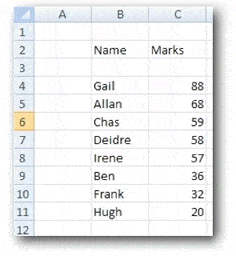
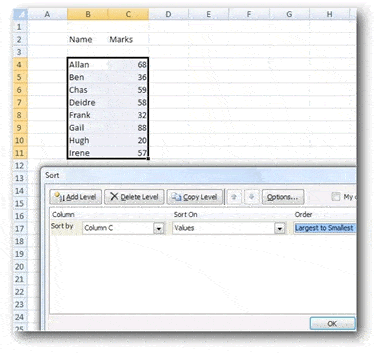 When sorted by column C, the result will be:
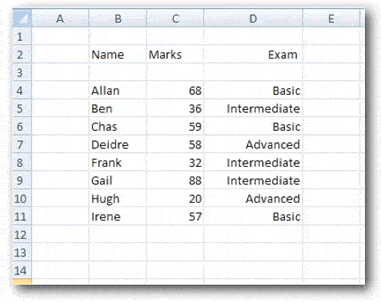 Turning on the filtering function for the range of cells will show drop-down lists:
 If Advanced and Intermediate are unselected, leaving only Basic, then the result will be:
 Margins: sets margins around what’s printed out.
Orientation: landscape of portrait paper orientation
Size: paper size eg A4, A3
Print area: allows specific areas to be printed
Breaks: specifies how the spreadsheet is to be split up for printing on different pages
Background: allows an image to be displayed as a background
Print titles: specifies rows and columns to repeat on each printed page.
Margins: sets margins around what’s printed out.
Orientation: landscape of portrait paper orientation
Size: paper size eg A4, A3
Print area: allows specific areas to be printed
Breaks: specifies how the spreadsheet is to be split up for printing on different pages
Background: allows an image to be displayed as a background
Print titles: specifies rows and columns to repeat on each printed page.

Introduction to Presenting information in spreadsheets
This chapter looks at the how information can be displayed as graphs and charts and how spreadsheet information can be printed out.Methods of summarising and analysing spreadsheet data
Spreadsheets have basic data handling facilities that, allow data to be sorted, ranked and filteredSorting
Sorting: this function allows a range of data to be sorted into ascending or descending order. For example:
When sorted by column C, the result will be:
Ranking
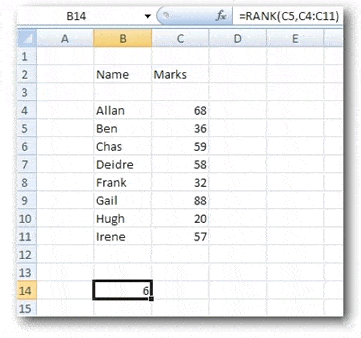
Ranking: this function allows the rank (ie order) of an item to be displayed. For example, Cell B14 below contains the formula =RANK(C4, C4:C11) The formula returns the result 6, meaning that the mark of 36 Cell C5) is sixth highest in the range specified (here C4:C11).
Filtering
Filtering: this allows you to look at only certain (filtered data). Say that in the spreadsheet shown below, you wanted to see only results relating to Basic exams.
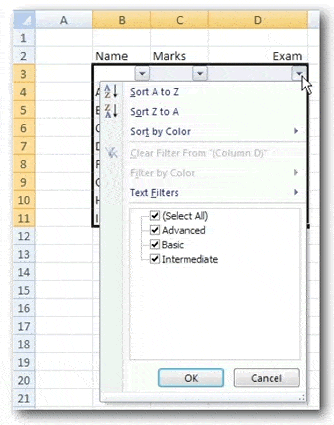
Turning on the filtering function for the range of cells will show drop-down lists:
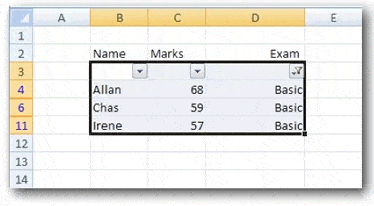
If Advanced and Intermediate are unselected, leaving only Basic, then the result will be:
Charts and graphs
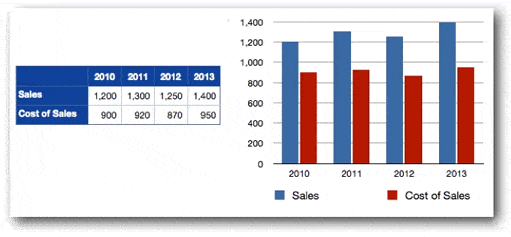
All spreadsheet programs allow charts and graphs to be easily prepared.Bar chart
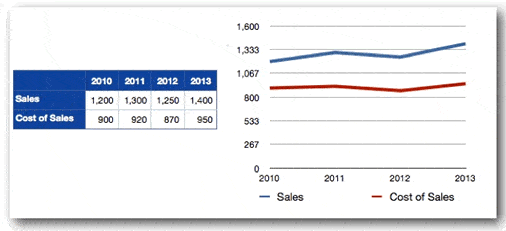
Line chart
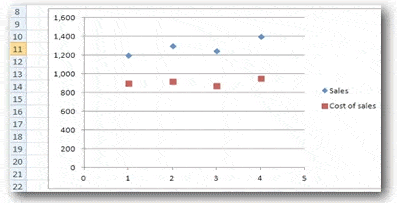
Scattergraph
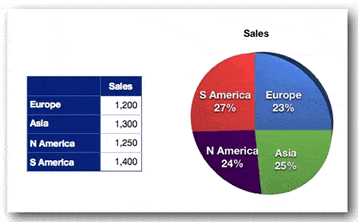
Pie chart
Printing spreadsheets
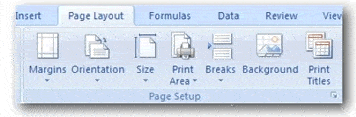
In Excel, the printing controls are:
Margins: sets margins around what’s printed out.
Orientation: landscape of portrait paper orientation
Size: paper size eg A4, A3
Print area: allows specific areas to be printed
Breaks: specifies how the spreadsheet is to be split up for printing on different pages
Background: allows an image to be displayed as a background
Print titles: specifies rows and columns to repeat on each printed page.
Comments
Be the first to leave a comment.
Leave a comment